SAFE Act-Guarded Mortgage Intelligence · 12 Loan Programs

Put a mortgage-aware AI Loan Officer Assistant inside every file—never on autopilot with your license.

ChosenAI requests exact borrower checklists across all 12 mortgage loan programs, automatically audits every upload for wrong-for-loan-type files and missing pages, surfaces morning priority queues, and pairs with Ava 24/7 Receptionist under strict SAFE Act and per-LO RBAC guardrails.

  • 30-day free trial
  • Credit card required
  • 60-day money-back guarantee
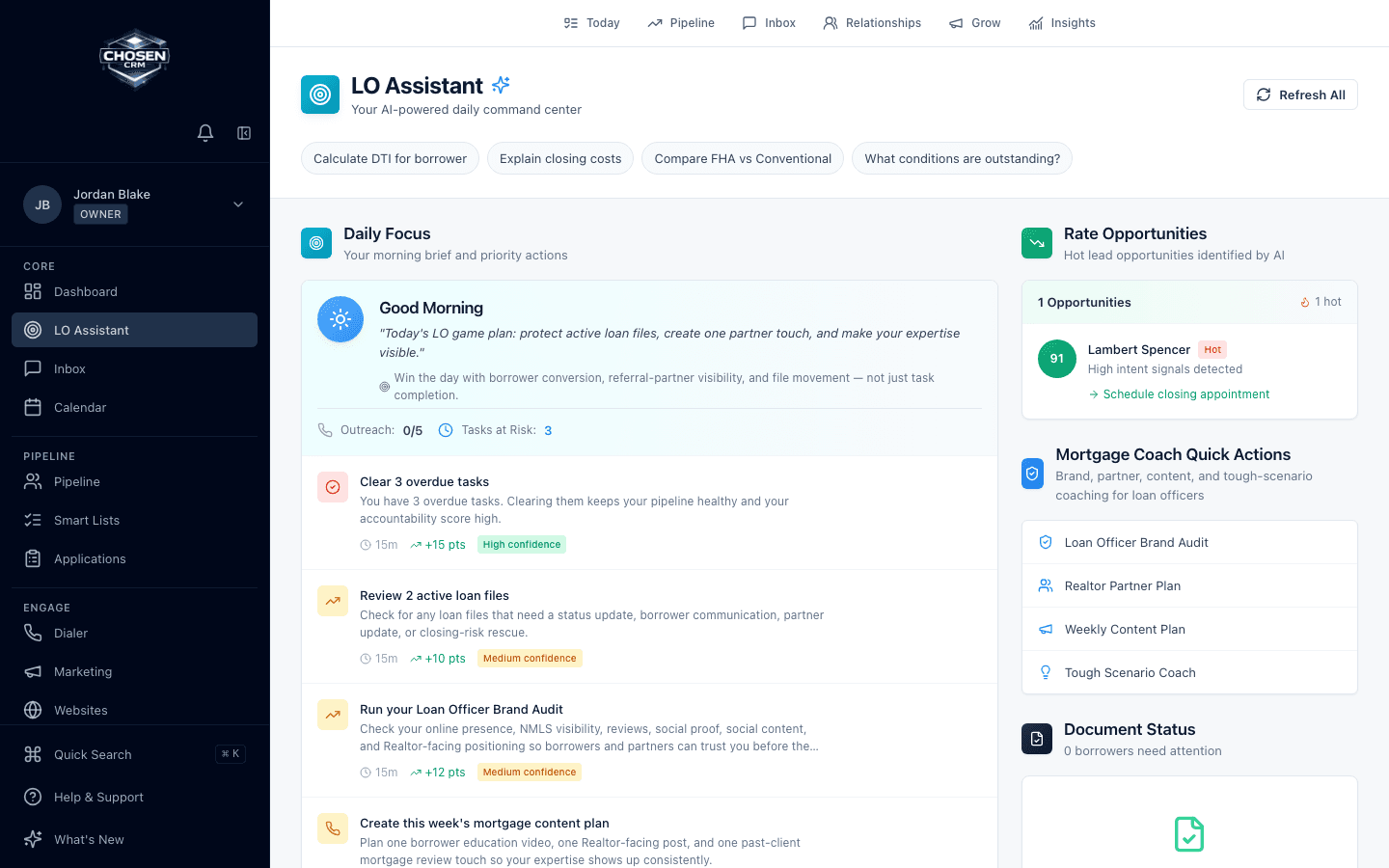
ChosenAI daily mortgage workspace showing prioritized follow-up actions, loan-type document audit alerts, and coaching reminders.
ChosenAI Loan Officer Assistant · real product interface shown with sample data

Direct answer

Verified · November 2026

What does ChosenCRM's AI Loan Officer Assistant do for mortgage loan officers?

ChosenCRM's AI Loan Officer Assistant (ChosenAI + Ava 24/7 Receptionist) maps 12 mortgage loan programs to exact document checklists, sends 1-tap Borrower Portal upload links via connected email and A2P SMS, and automatically audits uploads for wrong-for-loan-type files, missing pages, or screenshots. Operating strictly as a human-in-the-loop assistant, ChosenAI never quotes rates, makes credit decisions, or sends unapproved borrower rejections.

16-Second Walkthrough · Daily Focus & 24/7 Triage

Watch ChosenAI prioritize morning loan work while Ava triages missed calls.

See the ChosenAI morning focus briefing surface SLA-flagged purchase leads, unread borrower SMS threads, and Ava 24/7 inbound reception without unlicensed AI rate quotes.

16s Quick VideoChosenAI & Ava Walkthrough
00:00 / 00:16 · Light-Mode UI
ChosenCRM ChosenAI Copilot & Ava 24/7 Receptionist — 16-Second Walkthrough · real ChosenCRM Light-Mode workflow shown with sample data

54-Second Narrated Demo · 12-Program Document Requests & Automatic AI Review

Watch ChosenAI request the right docs for all 12 loan programs and catch bad uploads before underwriting.

See ChosenCRM's AI Loan Officer Assistant build exact checklists for VA, FHA, USDA, Jumbo, DSCR, Bank Statement, and VA IRRRL files, send real 1-tap Borrower Portal upload links by email and SMS, and automatically flag wrong-for-loan-type uploads side by side.

55s narrated Light-Mode walkthrough · real product UI shown with sample data

00:00 / 00:55 · Captions included · 12 Loan Programs · AI Pre-Audit · SAFE Act Guarded

  • 12 canonical loan programs (Conventional, FHA, FHA Rate-Reduction Refi, VA, VA IRRRL, USDA, Jumbo, DSCR, 12–24 Mo Bank Statement, ITIN, HELOC, Construction)
  • Real connected LO mailbox + A2P SMS delivery with 1-tap Borrower Portal upload links and recommended Smart Packs
  • Automatic AI Document Review catches wrong-for-loan-type files, missing pages, and screenshots with 1-click LO-reviewed rejection drafts

Capabilities & Compliance Boundaries

How does ChosenCRM's AI Loan Officer Assistant request, audit, and protect mortgage files?

Every capability operates inside strict per-LO RBAC visibility and clear LOS boundaries.

12-Program Document Requests & Automatic AI Review

One canonical loan-document matrix powers ChosenAI chat, Ava SMS Document Concierge, and the CRM Request Documents modal—then audits every uploaded file automatically against that exact loan program.

  • Auto-recommends VA, FHA, DSCR, Bank Statement, USDA, Jumbo & VA IRRRL packs
  • Flags wrong-for-loan-type uploads, missing pages, screenshots & stale dates
  • Side-by-side Document Preview with 1-click polite rejection draft prefill

Morning Next-Best-Action Focus

Start every day with an explainable priority list built from speed-to-lead timers, flagged document conditions, borrower replies, stage duration stalls, and weekly commitments.

  • Behavioral lead engagement scoring
  • Stalled pipeline stage & missing-doc bottleneck alerts
  • Borrower-aware email & SMS drafts from your connected mailbox

Ava 24/7 Voice & SMS Receptionist

Powered by Telnyx, Deepgram, Claude, and ElevenLabs, Ava triages after-hours and missed calls, texts loan-type document checklists, and books calendar slots.

  • Unified voice + SMS memory on one number
  • Loan-type-aware SMS document checklist & PII-redacted status updates
  • 2-way Google & Outlook Calendar booking with warm LO transfer

SAFE Act & Per-LO RBAC Locks

Unlicensed AI never quotes interest rates, APRs, or loan approvals, never unilaterally rejects borrower files, and enforces strict per-LO RBAC visibility on every query and document audit.

  • Strict prohibition on AI rate/APR quoting or underwriting decisions
  • Human LO approval before outbound requests or document rejections send
  • Zero cross-LO private borrower or document exposure

Canonical 12-Program Document Matrix

How does AI Document Review adapt to each mortgage loan program?

ChosenAI resolves the borrower's real loan program across Deal, 1003 Application, and Lead records so borrowers are never asked for irrelevant income docs—and wrong uploads are caught before underwriting.

Loan ProgramAuto-Requested Core & Specialty DocsWhat AI Document Review Flags Automatically
VA Purchase / RefinancePhoto ID, DD-214 (Member 4) or VA COE, 30-Day Paystubs/LES, 2-Yr W-2s, 2-Mo Bank Statements, Purchase ContractCatches W-2s uploaded into the DD-214/COE slot, missing bank statement pages, mobile screenshots, and stale dates.
DSCR Investment LoanPhoto ID, Executed Lease or Form 1007 Rent Schedule, 2-Mo Reserves, Entity/LLC Docs, Mortgage Statement (if refi)Skips W-2s, paystubs, and personal tax returns automatically—and flags missing lease/1007 schedules or incomplete reserve statements.
12–24 Month Bank StatementPhoto ID, 12 or 24 Consecutive Business Bank Statements (all pages), CPA Letter or Business License, P&L if requiredFlags partial month coverage (e.g. only 2 months uploaded instead of 12), missing trailing blank pages, and personal tax returns if unneeded.
FHA, USDA, Jumbo & VA IRRRL / FHA RefiProgram-tailored checklists: USDA household income docs, Jumbo 6–12 mo reserves, or VA IRRRL / FHA Rate-Reduction Note + Mortgage StatementVerifies required period coverage, catches missing tax schedules (Schedule C/E/K-1), and suppresses unneeded full-doc requests on rate-reduction refis.

4-Step Workflow

How does ChosenAI request and audit borrower documents on a mortgage file?

  1. 1

    Detect the borrower's loan program

    ChosenCRM merges Deal, 1003 Application, Employment, and Lead data into one canonical profile across all 12 mortgage loan programs so ChosenAI, Ava, and the CRM modal stay in sync.

  2. 2

    Send a 1-tap loan-type document request

    Approve ChosenAI's Request Documents action card or click the Recommended Smart Pack to mint a 1-tap Borrower Portal upload link delivered via your connected LO mailbox and A2P SMS.

  3. 3

    Auto-audit every upload against the loan type

    The moment a borrower uploads a PDF or phone photo, AI Document Review checks whether it matches the requested slot and loan program, scans for missing pages or screenshots, and redacts SSNs and account numbers.

  4. 4

    Review side by side & follow up in 1 click

    Open Document Preview or click AI Audit File on any Lead or Deal to inspect flagged items, prefill a polite replacement note for your approval, or request remaining missing loan-type documents in one click.

Frequently Asked Questions

Questions about AI Loan Officer Assistant, Document Review, and SAFE Act compliance.

Can ChosenCRM's AI Loan Officer Assistant request the right documents based on loan type?

Yes. ChosenCRM maps 12 mortgage loan programs—Conventional, FHA, FHA Rate-Reduction Refi, VA, VA IRRRL, USDA, Jumbo, DSCR, 12–24 Month Bank Statement, ITIN/Foreign National, HELOC/2nd Lien, and Construction/Renovation—to one canonical checklist. Asking ChosenAI or clicking a Recommended Smart Pack builds the exact checklist and sends a real 1-tap Borrower Portal upload link by connected email and A2P SMS.

How does automatic AI Document Review catch wrong uploads before underwriting?

Whenever a borrower uploads a document—or when a loan officer clicks AI Audit File on a Lead or Deal—ChosenCRM evaluates the file against the borrower's actual loan program and target checklist slot. It flags wrong-for-loan-type uploads (such as a W-2 uploaded into a VA DD-214/COE slot), incomplete date ranges, missing schedules or trailing pages, blurry mobile screenshots, and unnecessary documents like W-2s on a DSCR investor file.

Does ChosenAI automatically reject borrower documents or quote interest rates?

No. ChosenAI is a SAFE Act-compliant human-in-the-loop assistant. Flagged uploads display a non-blocking borrower tip, alert the assigned loan officer, and prefill a polite replacement draft inside Document Preview so a licensed human loan officer reviews and approves every rejection. ChosenAI never quotes binding interest rates, APRs, or underwriting approvals.

Does ChosenCRM ask DSCR investors or VA IRRRL borrowers for W-2s and paystubs?

No. The canonical 12-program matrix explicitly separates full-doc loans from DSCR, Bank Statement, VA IRRRL, and FHA rate-reduction refi programs—requesting Lease/Form 1007 and reserves for DSCR, 12–24 months of business bank statements for Bank Statement loans, and Note/Mortgage Statement items for IRRRL and rate-reduction files.

How does ChosenAI protect borrower data across different loan officers?

Every ChosenAI query, document request, and full-file document audit enforces tenant-level isolation and strict per-user role-based visibility guards (buildLeadVisibilityConditions, buildContactVisibilityConditions, buildDealVisibilityConditions) so a loan officer never accesses or audits another originator's private borrower records.
Try ChosenAI Loan Officer Assistant & Ava Receptionist Live

Start your 30-day mortgage trial today.

  • 30-day free trial
  • Credit card required
  • 60-day money-back guarantee