Pipeline Management

Pipelines That Match How You Actually Work

Industry-specific deal stages, not generic funnels. ChosenCRM ships with pipeline templates for mortgage, real estate, solar, and insurance — then lets you customize them to fit your exact workflow.

Reserve Early Access
app.chosencrm.com/dashboard
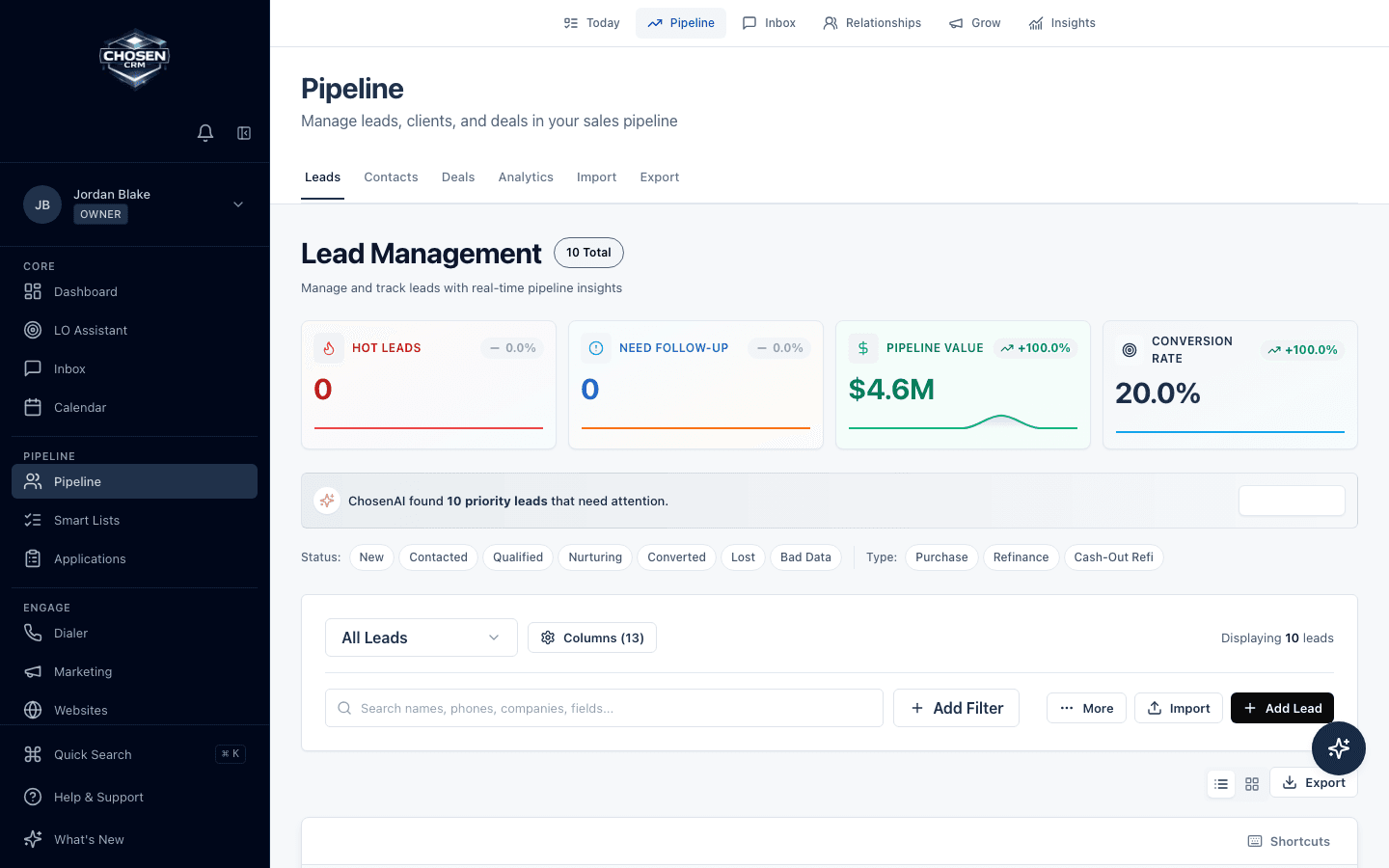
Drag-and-drop pipeline view with deal cards

Visual pipeline with drag-and-drop deal management

Capabilities

What you get

Core capabilities are built into the platform. Optional add-ons and custom integration work are disclosed separately.

Drag-and-Drop Deal Stages

Move deals through your pipeline with drag-and-drop. Each deal card shows key details — contact info, deal value, days in stage, and next action — so you can manage your pipeline without opening every record.

app.chosencrm.com/dashboard
Drag-and-drop pipeline view with deal cards

Visual pipeline with drag-and-drop deal management

Industry-Native Pipeline Templates

Start with pipeline stages built for your industry — not a blank slate. Mortgage gets pre-qual through funding. Real estate gets buyer and seller pipelines. Solar gets sales and install pipelines. Insurance gets new business and renewal pipelines.

app.chosencrm.com/dashboard
Industry-native pipeline template selector for mortgage real estate solar and insurance

Pipeline templates with vertical-specific stages for mortgage, real estate, solar, and insurance

Risk and Stall Detection

ChosenCRM flags deals that have been in the same stage too long, contacts that haven't been reached, and pipelines with gaps. You see problems before they become lost deals.

app.chosencrm.com/dashboard
Pipeline stall detection screen showing at-risk deals and reasons

Risk and stall detection with stage aging, missing actions, and next steps

Next-Best-Action Prompts

Each deal shows a recommended next action based on its stage, time elapsed, and recent activity. ChosenAI suggests whether to call, email, send documents, or escalate — not just that you should 'follow up.'

app.chosencrm.com/dashboard
Next-best-action prompts tied to pipeline records

Next-best-action prompts with suggested call, SMS, email, and task actions

Stage-Based Automation

Trigger actions when deals move between stages: send an email when a loan enters underwriting, schedule a task when a listing goes active, or alert a manager when a proposal is delivered. Automation runs on your pipeline, not alongside it.

app.chosencrm.com/dashboard
Stage-based automation rules tied to pipeline movement

Stage-based automation that creates tasks, messages, and alerts as deals move

Deal Progress Tracking

See how long deals spend in each stage, track conversion rates between stages, and identify where your pipeline leaks. Historical data builds over time to show trends in your sales cycle.

app.chosencrm.com/dashboard
Deal progress report with stage movement and stalled records

Deal progress tracking with stage movement, stalled deals, and owner accountability

Industry Examples

How Pipeline Management works across industries

Every vertical gets purpose-built workflows and terminology. Here is what that looks like in practice.

Mortgage

A loan officer's pipeline shows stages from Pre-Qual through Funded. A deal sitting in Underwriting for 8 days is flagged as at-risk. Moving a deal to Clear-to-Close automatically triggers a closing coordination email to the borrower.

Real Estate

An agent manages separate buyer and seller pipelines. A buyer deal moves from Active Search to Under Contract, triggering a task checklist for inspection, appraisal, and financing contingencies.

Solar

A solar team runs two pipelines — Sales (knock to signed contract) and Install (contract to commissioning). When a deal moves from Proposal Sent to Contract Signed, it automatically creates a project in the Install pipeline.

Insurance

A producer's new business pipeline tracks leads from Quote to Bound. A renewal pipeline runs in parallel, surfacing policies approaching expiration with retention outreach sequences.

Frequently Asked Questions

Yes. ChosenCRM ships with industry-native stages but you can add, remove, rename, and reorder stages to match your exact workflow. You can also create multiple pipelines if your business has different deal types.

Yes. You can run as many pipelines as you need. Real estate agents typically have buyer and seller pipelines. Solar teams run sales and install pipelines. Insurance agencies separate new business from renewals.

You configure expected time in each stage. When a deal exceeds that threshold, it's flagged as stalled. ChosenAI also detects patterns — like deals that stall after a specific stage — and surfaces systemic issues.

Yes. Pipeline reports show conversion rates between stages, average time per stage, deal velocity, and win/loss analysis. These reports are available per user, per team, and across the whole organization.

Ready to manage your pipeline your way?

Reserve your early access seat with a 60-day money-back guarantee.

Reserve Early Access